
Clicker Training, Explained Simply
Why a single click teaches faster than a treat alone — and how to start with the clicker built into Paw Plan.

Most training advice tells you to reward the behaviour you want. The problem is that by the time your hand reaches your pocket, finds a treat, and gets it to your dog's mouth, two seconds have passed — and in those two seconds your dog sat down, stood up, looked at the door, and stepped sideways. You meant to pay for the sit. From your dog's point of view, you paid for the step sideways.
A clicker solves exactly that problem, and only that problem. It is a sound that takes about 0.2 seconds and always sounds identical, which lets you say "that, right there" at the precise instant the behaviour happens. The treat can then arrive whenever you manage to produce it, because the click has already marked what earned it.
What the click actually is
In learning terms, a clicker is a secondary reinforcer — sometimes called a bridge or a marker. Food is a primary reinforcer: it is inherently valuable to your dog and needs no explanation. A click is not. To a fresh dog it is just a noise.
It gains meaning through pairing. Click, then food. Click, then food. After ten or fifteen repetitions the sound reliably predicts the food, and at that point the click carries the same emotional weight as the treat itself. Now it can travel where a treat cannot — across a room, into a split second, at the exact moment your dog's elbows touch the floor in a down.
Three properties make a marker work, and the click has all of them:
- It is short. Roughly two-tenths of a second, which is fine enough to mark a single moment rather than a stretch of time.
- It is identical every time. Your voice is not. "Yes!" said flatly at 8 a.m. and "YESSS!" said in the park carry different information. The click does not vary with your mood.
- It means nothing else. Your dog hears your voice all day, praising, asking, telling off. The click only ever happens in one context.
That last point is why a marker word, while useful, is a slightly weaker version of the same idea.
The one rule to keep in your head
Everything below is detail. The rule is this:
Behaviour → click → treat.
In that order, every time. The click comes after the behaviour and before the treat. It is not a signal to your dog to do something, and it is not a reward on its own — it is a bookmark that tells your dog which of the hundred things they just did was the one you liked.
Charging the clicker
Before your first training session, you have to teach your dog what the sound means. This is called charging or loading the clicker, and it takes about two minutes.
- Sit somewhere quiet with 10–15 small, soft treats.
- Click once.
- Deliver a treat within a second or so. Your dog does not have to do anything — genuinely nothing. Standing there is fine.
- Wait 3–5 seconds.
- Repeat 10–15 times.
You will know it has landed when your dog's head snaps towards you at the sound, or they look expectantly at your treat hand before you have moved it. That is the whole test.
If your dog flinches at the noise, the marker is too sharp for them. Muffle a physical clicker in your pocket or lower the phone volume, charge at that level, and raise it gradually across a few sessions. A dog who is startled by the click will learn to avoid the thing they were doing when it happened, which is the exact opposite of the intention.
Using it in a real session
Once the clicker is charged, the workflow for teaching anything new looks the same.
Pick one behaviour. Sit, down, touch, four paws on a mat. One per session.
Get the behaviour to happen. Lure it with food, capture it when your dog offers it by accident, or shape it in small approximations. The clicker does not make behaviour happen — it tells your dog which behaviour was correct once it does.
Click at the exact moment. Not as your dog is about to sit, not once they are settled — at the instant the bottom touches the floor. Timing is the entire skill of clicker training, and it takes practice. Watching a specific body part rather than the whole dog helps: the rear end for a sit, the elbows for a down, the nose for a target.
Treat within one to two seconds of every click. No exceptions while teaching.
Keep it to 5–10 minutes. Attention drops off sharply after that, and a tired dog starts guessing, which teaches them that guessing works.
End on a success. Get one clean repetition, click, pay, and stop. What your dog remembers most is how the session finished.
If you are teaching a first command from scratch, the mechanics of luring are laid out in teach your dog to sit — add the click to that method and it gets noticeably faster.
When to add the word
A common mistake is clicking and naming at the same time. Keep them separate.
Use the clicker to build the behaviour first, with no verbal cue at all. Once your dog is offering it reliably — eight or nine times out of ten — start saying the word just before you prompt the behaviour, then click when it happens. After twenty or thirty of those pairings, the word carries the meaning on its own.
Naming a behaviour before it is reliable is the classic error. The word ends up attached to your dog's guessing rather than to the behaviour, and later you blame a dog who "knows sit but ignores me."
The rules that actually matter
These are the things that separate clicker training that works from clicker training that quietly stops working.
Do:
- Click the instant the behaviour happens. Late clicks mark the wrong thing. A click half a second after the sit marks whatever came half a second after the sit.
- Treat within 1–2 seconds of every click. The click is a promise. Keep it.
- One click per behaviour. One sit, one click.
- Keep sessions 5–10 minutes. Several short sessions across a day beat one long one — a single focused block a day beats an hour at the weekend.
- End on a win. Always.
Don't:
- Never click without treating. The click is only powerful because it always predicts food. Break that a few times and it degrades into background noise, and you have to recharge it.
- Never use the click to get your dog's attention. It is not a recall, not a "come here," not a "look at me." Clicking to summon your dog teaches them that the sound means walk over, which destroys its use as a marker for anything else.
- Never double- or triple-click. Multi-clicks blur which moment you meant. If you want to say "that was excellent," click once and pay three treats in a row instead.
- Don't click to interrupt something. The click means "yes, that." Clicking while your dog is barking or jumping tells them the barking was correct.
Using a phone as a clicker
A clicker app produces the same fixed-length marker sound as a plastic box, and the learning works identically — your dog cannot tell the difference, and does not care.
The clicker in Paw Plan is a big blue circle you tap. Each tap plays the marker and ticks up a TIMES counter so you can see how many reps you have done in the session; the counter resets when you leave the screen, which is deliberate — it is a rep counter for the current five minutes, not a lifetime score. The in-app rule sits right on the screen: behaviour → click → treat.
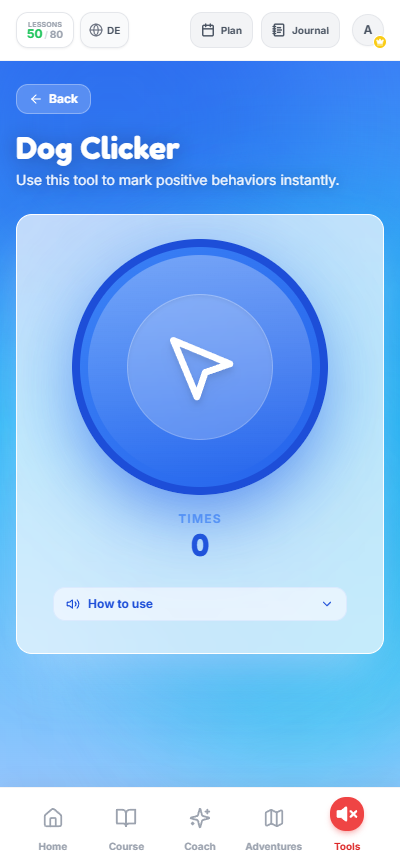
One tap, one marker. The counter tracks reps for this session only.
Practical notes specific to phones:
- Set the volume before you start, not mid-session. Somewhere around half volume is usually right indoors. Test it once with the dog out of the room.
- Hold the phone in the hand that is not delivering treats. Fumbling costs you the timing you bought the clicker for.
- Watch the dog, not the screen. Learn where the button is by feel in the first thirty seconds, then keep your eyes on the behaviour.
- Silence notifications. A message alert arriving mid-session is an unpaired sound at best and a startle at worst.
- Outdoors is louder than you think. On a windy pavement a phone speaker can disappear. Indoors and in gardens it is fine; for a noisy park a physical clicker or a clear marker word carries better.
Fading the clicker out
The clicker is scaffolding. Once a behaviour is on cue and reliable, you take it down.
Move through this in order, and only for behaviours that are genuinely solid:
- Stop clicking that behaviour. Keep paying, sometimes, with food and praise.
- Go intermittent with the food too. Pay roughly every second or third repetition. Unpredictable payment keeps a known behaviour strong.
- Keep the clicker for whatever is new. You might click a first sit in week one, then never click a sit again — and pick the clicker back up in month four to teach a chin rest.
A behaviour you never pay for again will fade over months. That is not a failure of clicker training; it is how learning works in every species.
What a clicker cannot do
This is where honest advice separates from marketing.
A clicker is a teaching tool for new behaviours. It is excellent at building things: sit, down, place, targeting, recall foundations, husbandry cooperation. It is not a solution to emotional problems, and using it as one usually makes things worse.
- It is not a fix for reactivity or aggression. A dog lunging at other dogs is having an emotional response, not a training gap. There are protocols that use markers as one component, but they are built around distance, thresholds, and counter-conditioning — and they belong with a qualified behaviourist, not a blog post.
- It is not a recall device. Clicking to call your dog is the single fastest way to ruin a clicker.
- It is not an interrupter. For stopping a behaviour in progress — barking at the window, for instance — you need a different tool entirely; see how to stop a dog from barking.
- It does nothing for fear. A frightened dog cannot learn. If your dog is too anxious to take food, the session is already over.
When to get help
Talk to a certified trainer or a veterinary behaviourist if:
- Your dog growls, snaps, stiffens, or freezes in any training context. Stop training and get an assessment — a clicker cannot address that, and pushing on can make it worse. The early signals are worth learning to read; reading dog body language covers them.
- Your dog will not take food in a situation where they normally would. That is a stress signal, not stubbornness.
- Behaviour has changed suddenly. Abrupt changes in trainability, appetite, or tolerance are medical until proven otherwise — vet first.
- You have practised the same thing consistently for three or four weeks with no progress at all. Something in the setup is wrong, and a single session with a good trainer usually finds it faster than another month alone.
Used properly, a clicker is not magic. It is a way of being precise, and precision is what makes training feel fast. Two minutes to charge it, five minutes a day to use it, and one rule — behaviour, click, treat.
The cues where that precision pays off most are the moving ones, because the moment worth marking is brief: loose-lead walking, recall, and the head-turn away from temptation in leave it.
Common questions
- What does a clicker actually do?
- It marks the precise instant your dog does the right thing. The click itself means nothing to a dog until you pair it with food ten to fifteen times — after that it becomes a promise that a treat is coming, which lets you communicate 'that, right there' in about 0.2 seconds.
- Do I have to treat after every single click?
- Yes, every time, while you are teaching. The click only works because it reliably predicts food. Click without paying a handful of times and the sound stops meaning anything, and you have to charge it again from scratch.
- Can I use my phone as a clicker?
- Yes. A phone clicker produces the same fixed-length marker sound and works the same way, as long as the volume is set before you start and your dog isn't spooked by the phone itself. The main trade-off is that you have to keep the screen open.
- Do I need a clicker forever?
- No. A clicker is a teaching tool for new behaviours. Once a behaviour has a name and happens reliably on cue, you retire the click for that behaviour and keep it for whatever you teach next.


